
Surprisingly, finding the Best WordPress Hosting for WooCommerce Stores is easier today, than ever before. There's been plenty of reviews, user feedback, complete fallouts, and huge improvements in this space.
If you are looking to start a WooCommerce store, now is a good time.
If your WooCommerce store makes money only when the site is live, uptime is revenue. The best hosting choice is not the cheapest plan or the one with the biggest marketing claim; it is the one that protects checkout, survives traffic spikes, and gives you support that understands WooCommerce when something breaks.
For stores that cannot afford downtime, the safest shortlist starts with managed WooCommerce platforms built for isolation, scaling, and support quality. That is why a business owner should pay close attention to options like Kinsta's Managed Platform when reliability matters more than bargain pricing.
Table of Contents
What “good hosting” actually means for a WooCommerce store
A WooCommerce store has a very different traffic pattern than a blog or brochure site. Product pages may be heavily visited, but cart, checkout, account, and admin actions are dynamic and generally should not be cached in the same way static pages are.
That means your host has to do more than “run WordPress fast.” It needs to keep database activity stable, handle simultaneous shoppers, and avoid collapse when ads, email campaigns, or influencer traffic arrive all at once.
The practical hosting features that matter most are:
- High uptime with a published SLA, ideally 99.9% or better.
- Automatic scaling so sudden traffic spikes do not take the store offline.
- Isolation and redundancy so one noisy site or one failing node does not drag everything down.
- WooCommerce-aware support that can diagnose checkout, plugin, cache, and database issues quickly.
- Performance features such as caching, object caching, and CDN support.
If a host cannot explain those points clearly, it is not a serious fit for a store that depends on every minute being live.
The hosting types that matter most
Not all WordPress hosting is equally suited to WooCommerce. In practice, there are four broad categories.
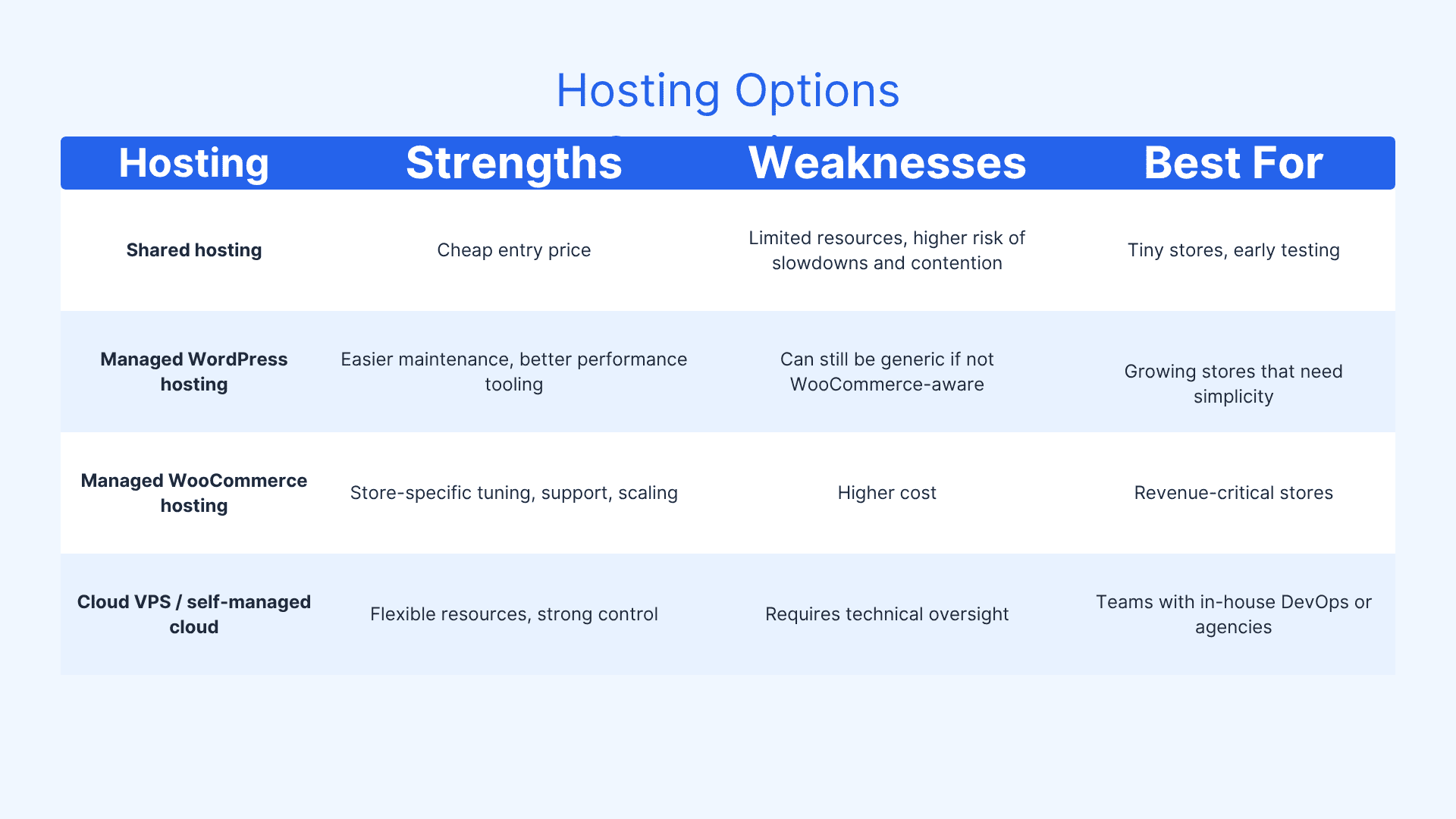
Why downtime is more expensive than hosting?
Downtime is not just “a site issue.” It usually hits four business areas at once:
- Lost orders from shoppers who abandon carts when pages fail.
- Ad waste when paid traffic lands on a broken checkout.
- SEO and quality issues when search engines or users repeatedly encounter errors.
- Brand trust damage because customers remember the failed purchase more than the recovery email.
That is why hosts with redundancy and transparent uptime reporting are worth the extra budget. A platform that can reroute traffic when a node fails is often cheaper than the revenue lost during a single outage.
The non-negotiables for a no-downtime store
If you are comparing hosts, prioritize these requirements first.
1) Uptime with a real SLA
Many hosts advertise 99.9% uptime, but the important question is whether they back it with a clear SLA and meaningful reporting. A hosting company that is transparent about uptime is usually more trustworthy than one that only markets “blazing fast speed.”
2) Automatic vertical scaling
WooCommerce traffic can spike fast. A flash sale, paid campaign, or product mention can multiply requests in minutes. The host should be able to add resources automatically or with minimal intervention so the store does not crash exactly when demand surges.
3) Object caching and CDN support
WooCommerce has dynamic pages that do not benefit from typical full-page caching in the same way content pages do. That is why object caching, edge delivery, and a well-configured CDN matter so much for keeping the store responsive under load.
4) Isolation from other sites
A store should not suffer because another customer on the same infrastructure is misconfigured or overloaded. Isolated cloud infrastructure reduces the “bad neighbor” problem and helps protect checkout reliability. This is where Kinsta's Isolated Cloud Infrastructure is especially relevant for owners trying to minimize risk.
5) Support that knows WooCommerce
General WordPress support is helpful, but WooCommerce-specific support is a different category. A host should understand plugin conflicts, checkout failures, database strain, and caching exceptions, not just basic WordPress installs.
What to look for in a host’s feature list
A strong WooCommerce host should offer most of the following:
- Staging environments for safely testing updates before pushing live.
- One-click backups and fast restores for rollback after failed updates.
- Free SSL for trust and checkout security.
- Server-level caching tuned for WordPress and WooCommerce.
- PHP version control so you can stay compatible with modern plugins.
- Resource visibility so you can see when CPU, RAM, or PHP workers are getting tight.
- Malware scanning and security controls to reduce the chance of compromise.
- Migration help so moving from a fragile host does not create a new outage window.
These are not luxury extras. For an active store, they are basic risk controls.
Why cheap hosting usually becomes expensive
The biggest mistake store owners make is buying hosting as if it were a fixed overhead instead of an insurance policy on revenue. Cheap plans often look fine until you add real traffic, product images, plugins, and payment processing.
Problems usually show up in this order:
- slow admin screens,
- delayed cart responses,
- checkout errors,
- resource throttling,
- and eventually a full outage.
At that point, the “cheap” plan has become expensive through lost sales and emergency migration work. Hosting advice from WooCommerce-focused sources consistently points toward performance, scalability, and support quality as the real decision criteria, not just advertised price.
With the new release of WordPress 7.0, the stabler and faster version needs more resources.
A practical shortlist by store stage
For a small but revenue-dependent store
Choose a managed WordPress or entry-level managed WooCommerce host with strong support, daily backups, SSL, and staging. You are not buying for scale yet, but you are buying to avoid preventable downtime.
For a growing store with paid traffic
Choose managed WooCommerce hosting with automatic scaling, caching, and a clear SLA. If your marketing team can create spikes on demand, your host must be ready for that too.
For a high-volume or mission-critical store
Choose infrastructure designed for isolation, redundancy, and operational support. This is the point where a premium platform becomes a business continuity decision, not a tech preference. Business owners comparing this class of provider should look closely at Kinsta's Managed Platform because the right architecture can remove a lot of outage risk before it reaches customers.
Where hosts differ in the real world
Most hosting comparison articles recommend looking at performance, security, scalability, and support quality together rather than focusing on one metric alone.
That advice is correct, but for WooCommerce you should rank them in this order:
- Reliability
- Checkout performance
- Scaling behavior
- Support expertise
- Price
That order matters because a fast host that goes offline during a campaign is worse than a slightly slower host that stays up and keeps converting.
The hidden costs of a bad fit
If your host is wrong for WooCommerce, the costs are not always obvious on day one.
- Plugin conflicts can multiply support tickets and recovery time.
- Theme bloat can slow the storefront and increase server load.
- Too many plugins can increase response times and create conflicts.
- Inadequate scaling can turn a good launch into a broken one.
- Weak support can extend a minor issue into a full outage.
In other words, the hosting decision affects operations, marketing, development, and finance at the same time.
A simple buying framework
Before you buy, ask every provider these questions:
- What uptime guarantee do you offer, and what is in the SLA?
- How do you handle traffic spikes automatically?
- Is my store isolated from other customers?
- Do you provide object caching and CDN support?
- Do your support agents understand WooCommerce issues specifically?
- How fast can I restore a backup?
- What happens if a server node fails?
- Are staging sites included?
- How do you measure and report performance?
If a sales rep answers vaguely, keep moving.
Bottom line for WooCommerce store owners
For a WooCommerce store that cannot afford downtime, the best WordPress hosting is the one that protects sales first and simplifies operations second. That usually means managed WooCommerce hosting with strong uptime, automatic scaling, isolation, and expert support.
If you want the safest path, think in terms of infrastructure quality, not just hosting price. A platform like Kinsta's Managed Platform becomes compelling when the cost of one outage is higher than the monthly hosting bill, because the real job of hosting is not to exist on paper — it is to keep the store selling when demand arrives.
Read More: